> ## Documentation Index
> Fetch the complete documentation index at: https://docs.ruloans.com/llms.txt
> Use this file to discover all available pages before exploring further.
# How to apply for ESY Home Finance Home Loan in Ruloans Webapp
> Flow of Assisted Journey of ESY Home Finance HL on Ruloans
**Introduction:**
This document provides a comprehensive step-by-step guide for Customers to apply for a loan using the Rulaons platform. It highlights mandatory and optional fields, supported by screenshots, to ensure clarity and completeness.
## Step 1: Access the Rulaons Platform\*\*
Open the Ruloans platform at [https://www.ruloans.com/](https://www.ruloans.com/)
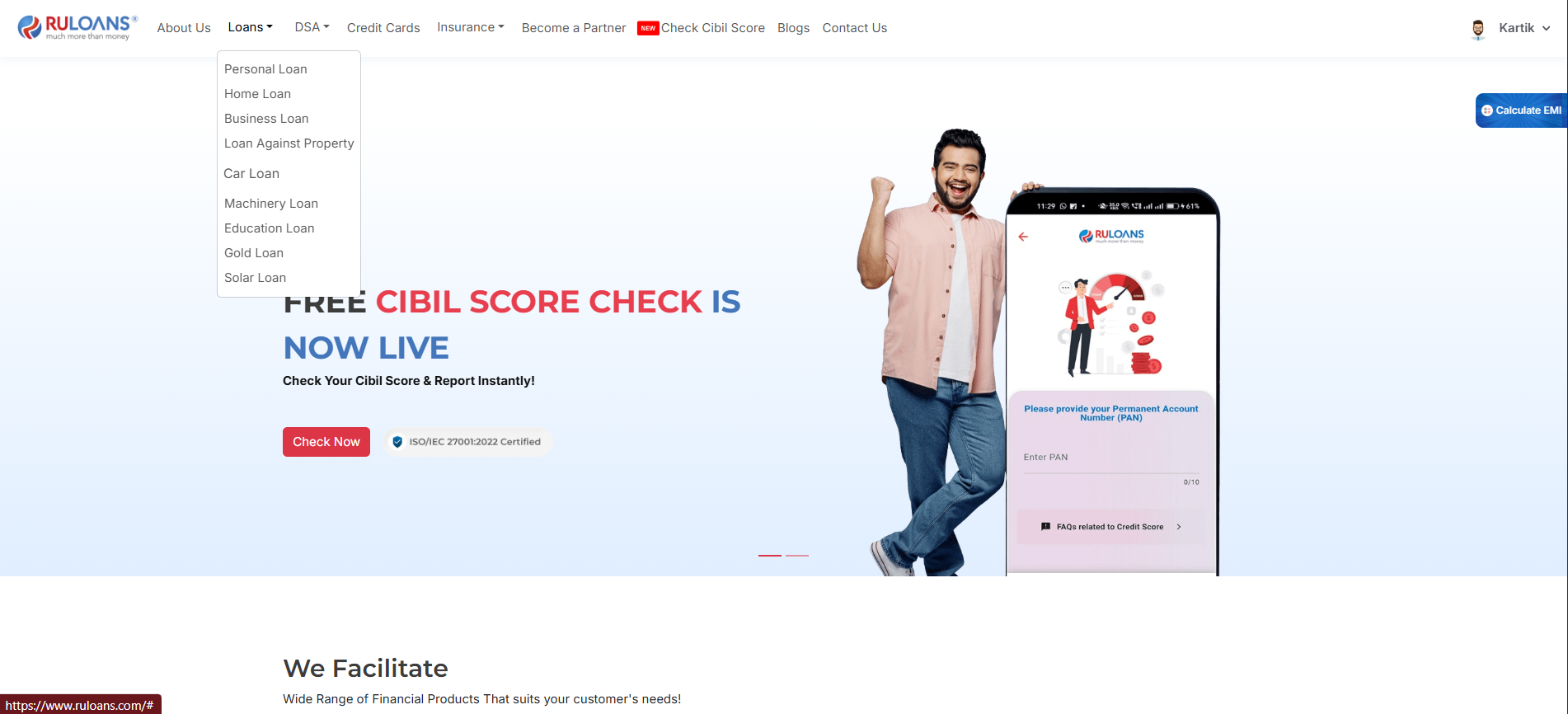
## Step 2: Navigate to the Dashboard
1. After successful login, you will land on the **Dashboard**.
2. The Dashboard provides:
* **Quick Access Links**: Links to personal loans, home loans, and other products.
* **Status Overview**: To proceed, click "Loans" to view the available list and select your required loan type.
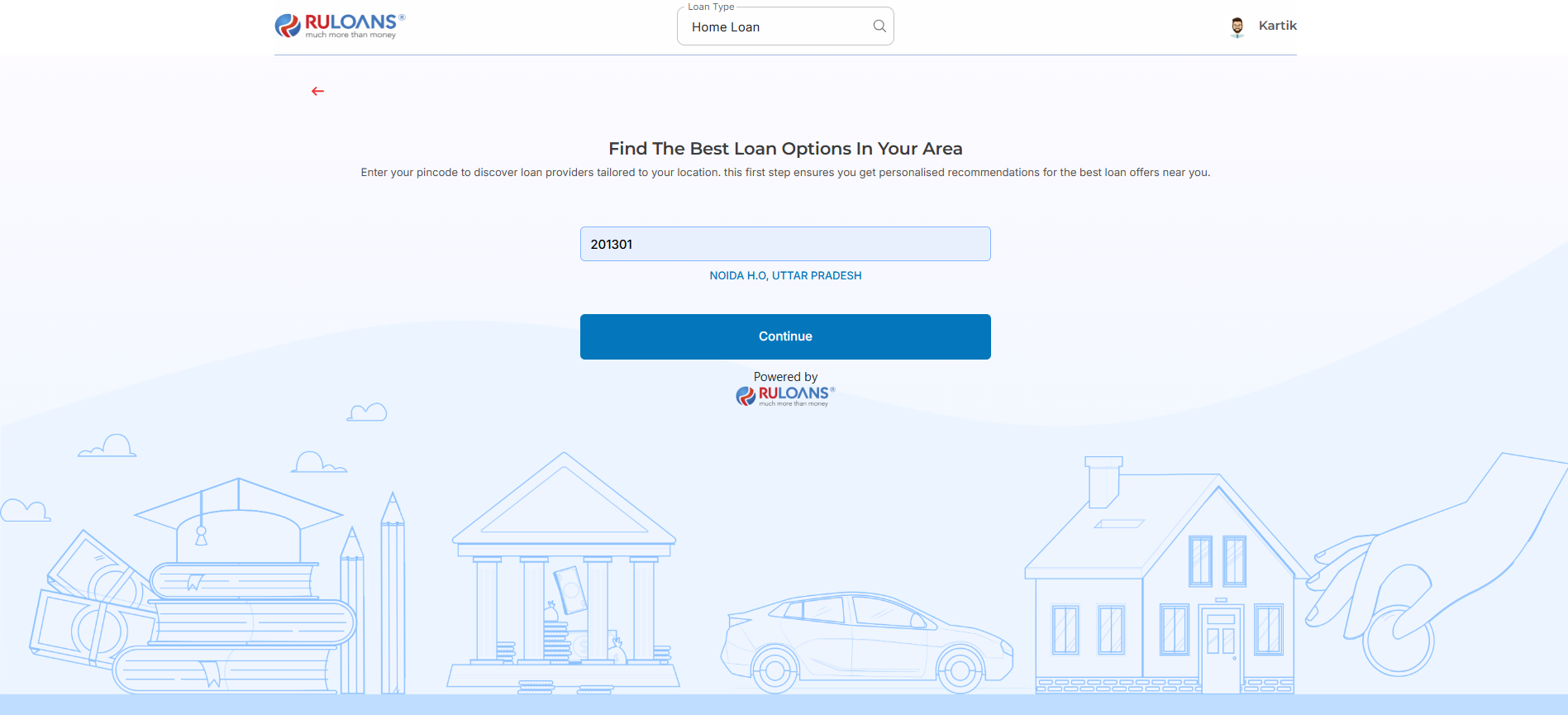
 ## Step 3: Enter Your Pincode
* **Pincode**: Enter the 6-digit postal code of your residence or business address.\
This helps us verify your location and show eligible offers.
* Tap **Continue**.
## Step 3: Enter Your Pincode
* **Pincode**: Enter the 6-digit postal code of your residence or business address.\
This helps us verify your location and show eligible offers.
* Tap **Continue**.
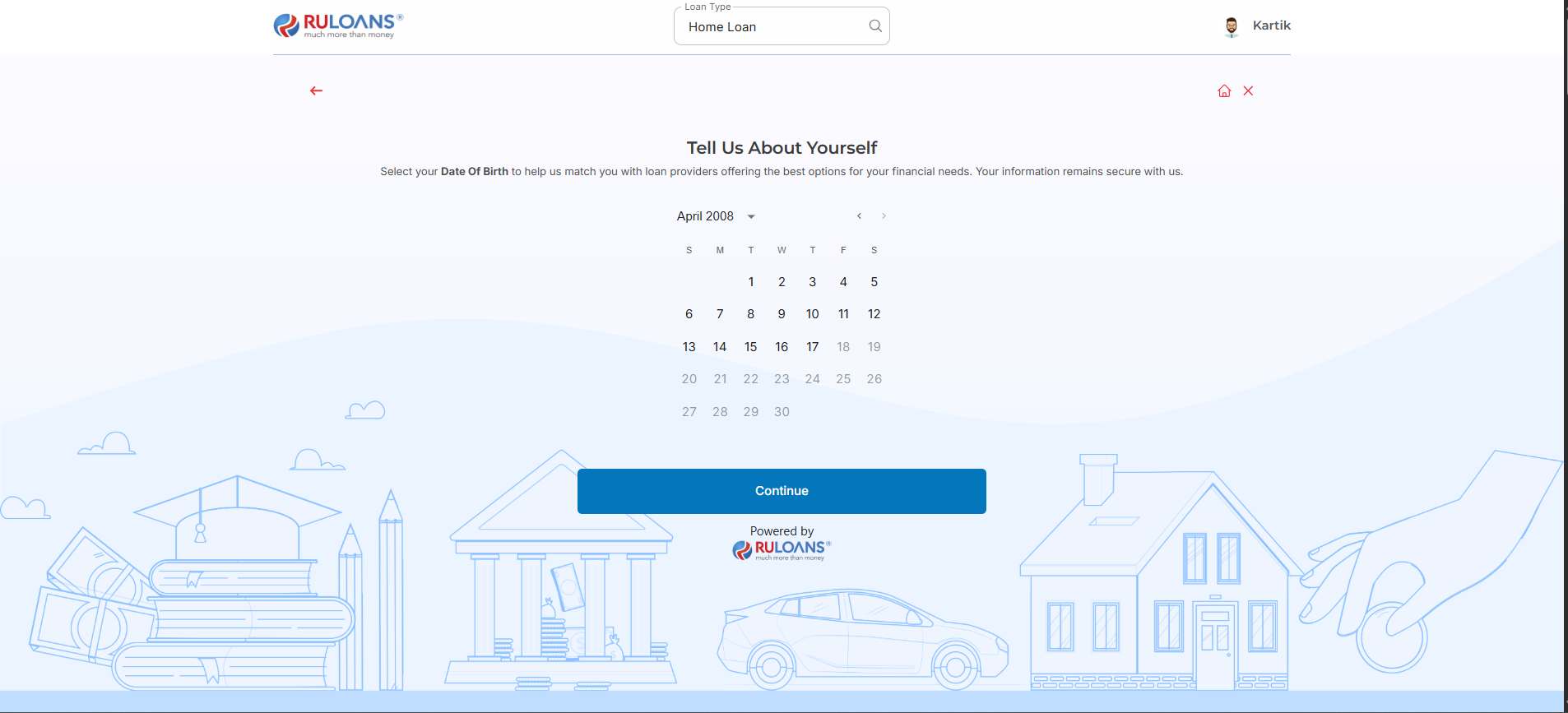
 ## Step 4: Enter Your Date of Birth
* **Date of Birth**: Select your date of birth using the calendar picker.\
This helps determine your eligibility and age-based offers.
* Tap **Continue**.
## Step 4: Enter Your Date of Birth
* **Date of Birth**: Select your date of birth using the calendar picker.\
This helps determine your eligibility and age-based offers.
* Tap **Continue**.
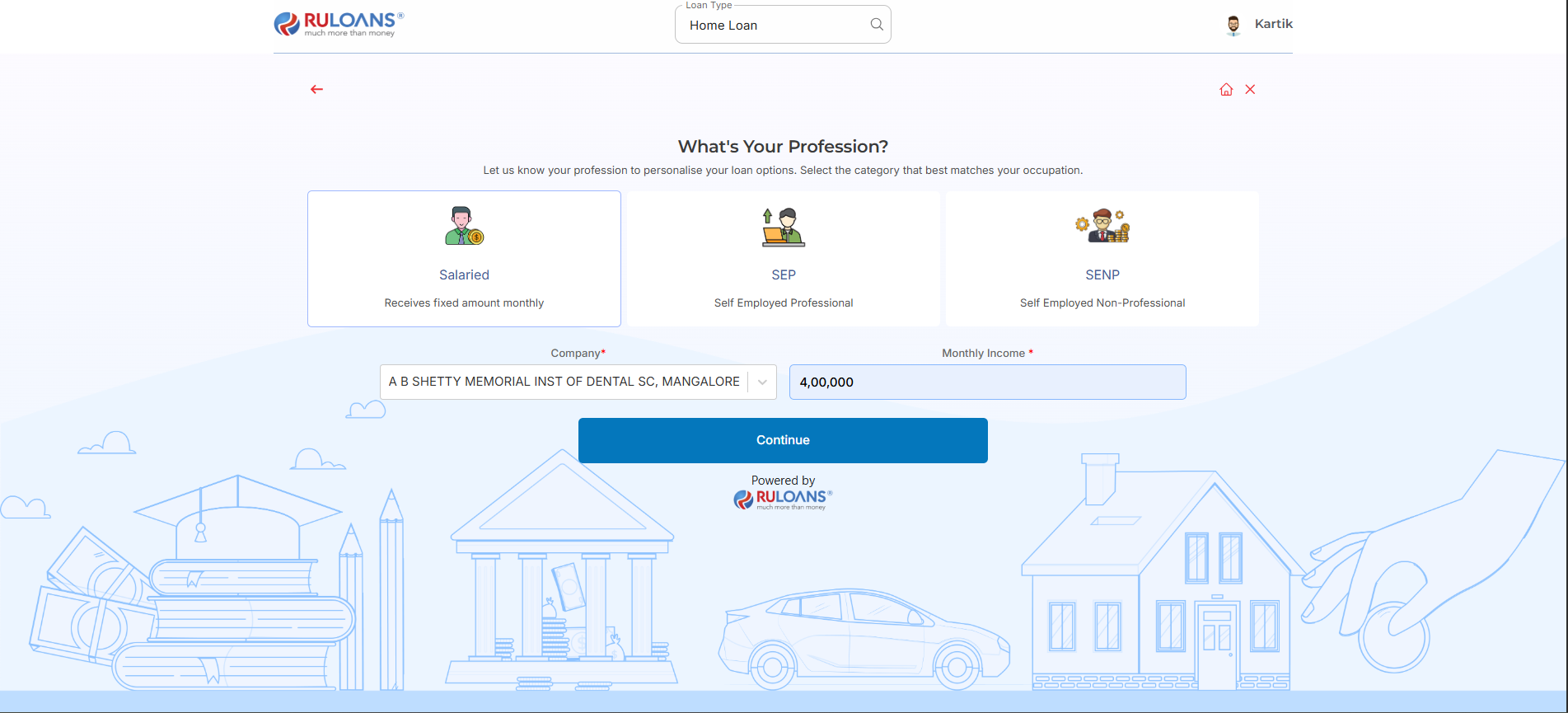
 ## Step 5: Choose Your Profession
Select the category that best describes your employment type:
* **Salaried** - If you work for a company or organization.
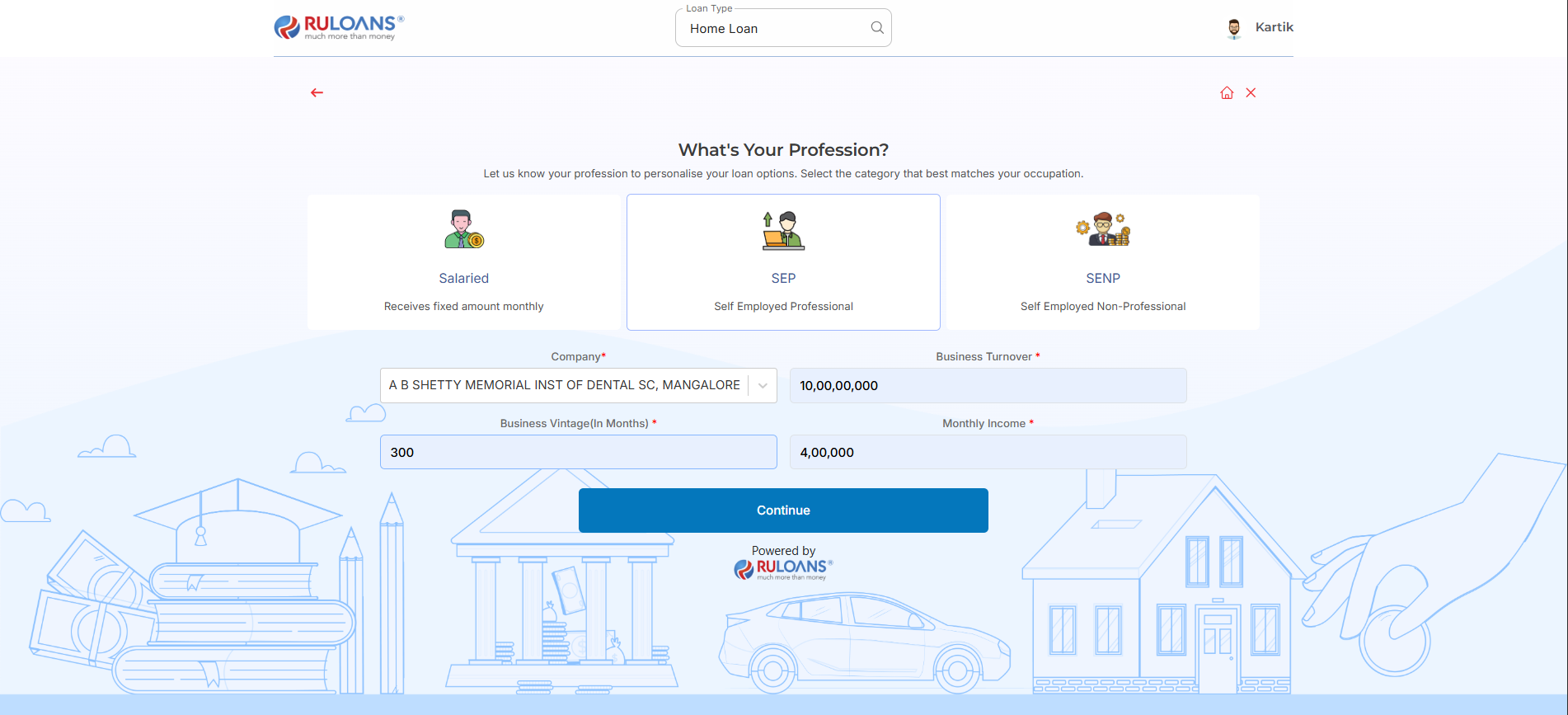
* **Self-Employed** - If you are a freelancer, consultant, or professional.
* **Business Owner** - If you run a business, either registered or informal.
### If **Salaried**:
* **Company Name**: Name of your employer.
* **Monthly Income**: Your average take-home salary each month.
### If **Self-Employed** or **Business Owner**:
* **Business Name / Company Name**: Name of your business or profession.
* **Business Turnover**: Approximate annual income from your business/profession.
* **Business Vintage (in months)**: How long you've been running it.
* **Monthly Income**: Your average net income per month.
* Tap **Continue**.
## Step 5: Choose Your Profession
Select the category that best describes your employment type:
* **Salaried** - If you work for a company or organization.
* **Self-Employed** - If you are a freelancer, consultant, or professional.
* **Business Owner** - If you run a business, either registered or informal.
### If **Salaried**:
* **Company Name**: Name of your employer.
* **Monthly Income**: Your average take-home salary each month.
### If **Self-Employed** or **Business Owner**:
* **Business Name / Company Name**: Name of your business or profession.
* **Business Turnover**: Approximate annual income from your business/profession.
* **Business Vintage (in months)**: How long you've been running it.
* **Monthly Income**: Your average net income per month.
* Tap **Continue**.
 ## Step 6: Select Loan Amount & Duration
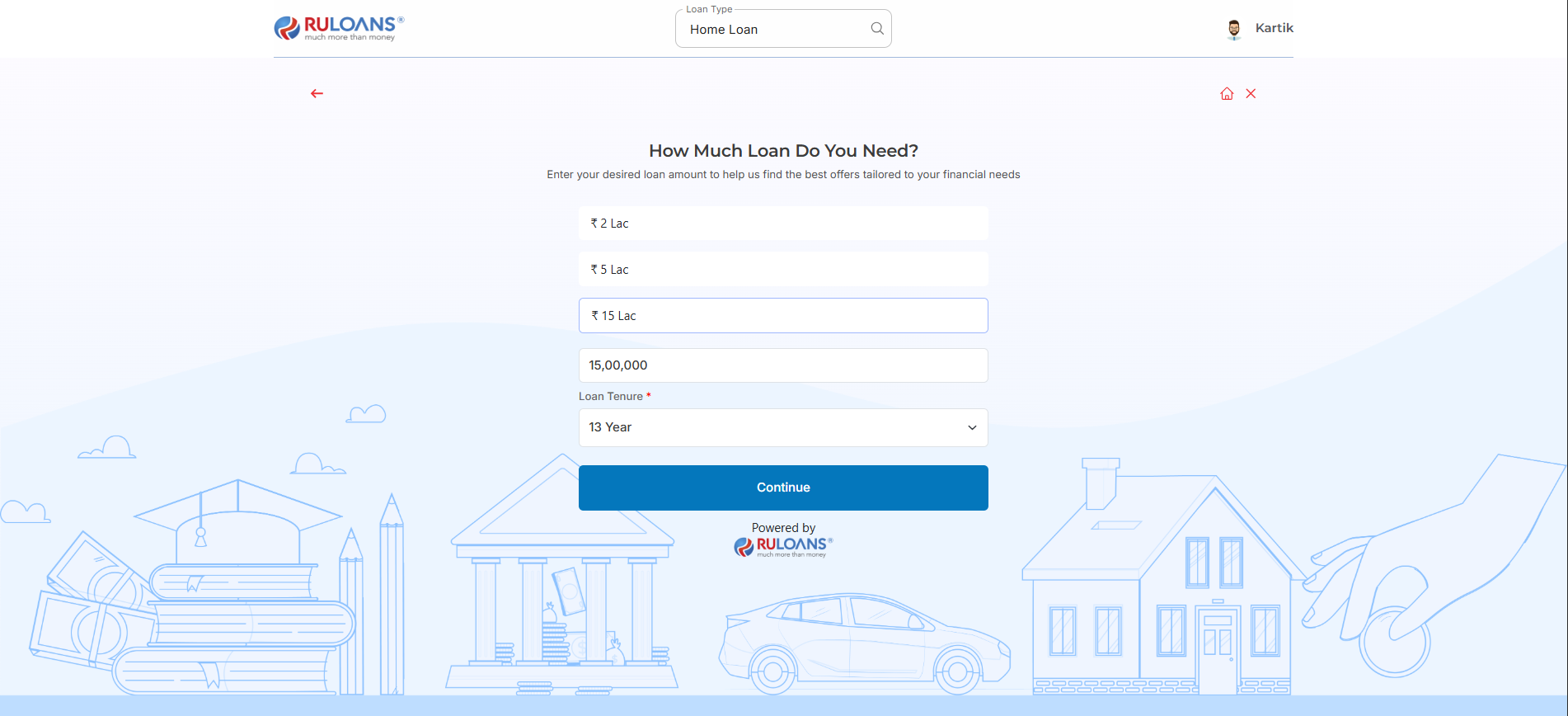
* **Loan Amount**: Choose a preset amount (e.g., ₹ 2L / ₹ 5L / ₹ 15L) or enter a **Custom Amount**.
* **Loan Tenure**: Choose the repayment period (in years).
* Tap **Continue**.
## Step 6: Select Loan Amount & Duration
* **Loan Amount**: Choose a preset amount (e.g., ₹ 2L / ₹ 5L / ₹ 15L) or enter a **Custom Amount**.
* **Loan Tenure**: Choose the repayment period (in years).
* Tap **Continue**.
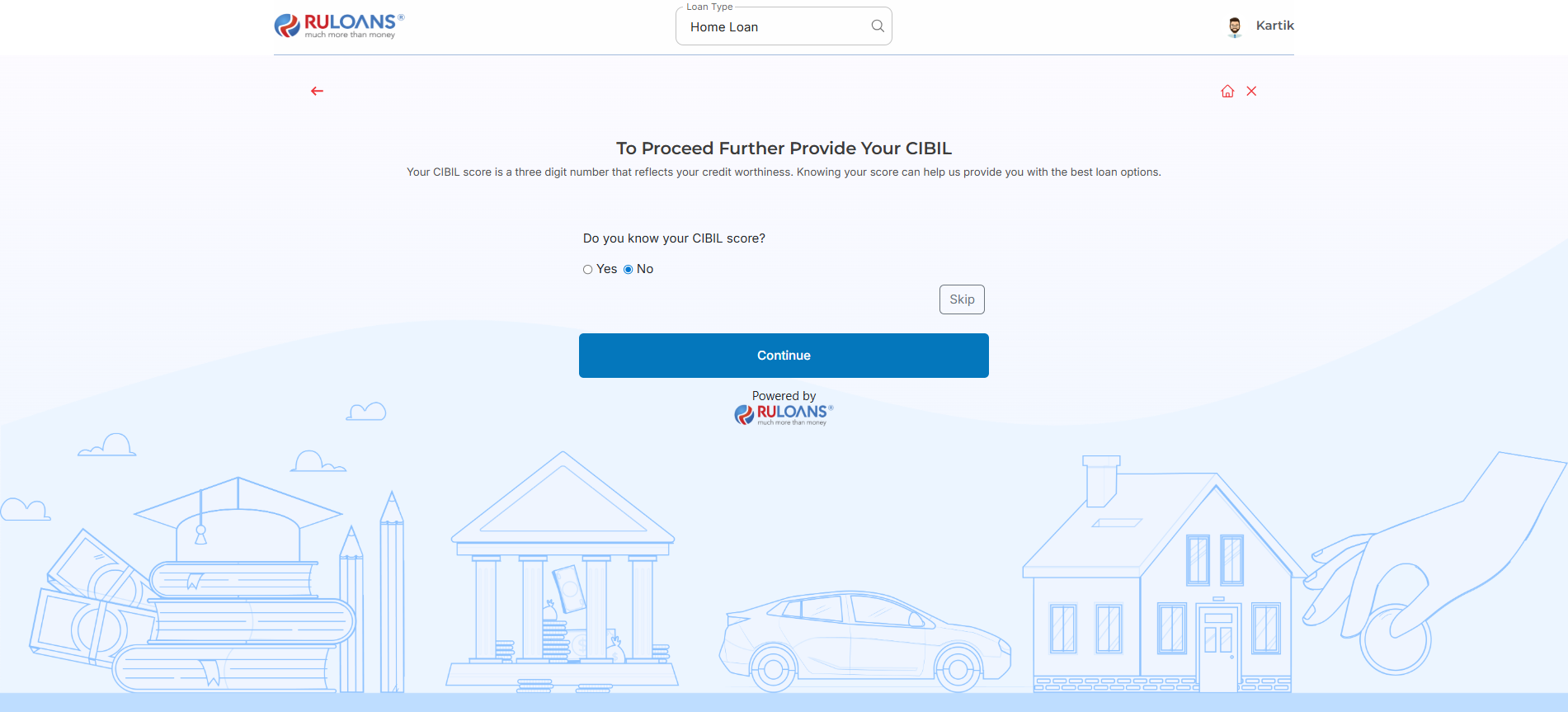
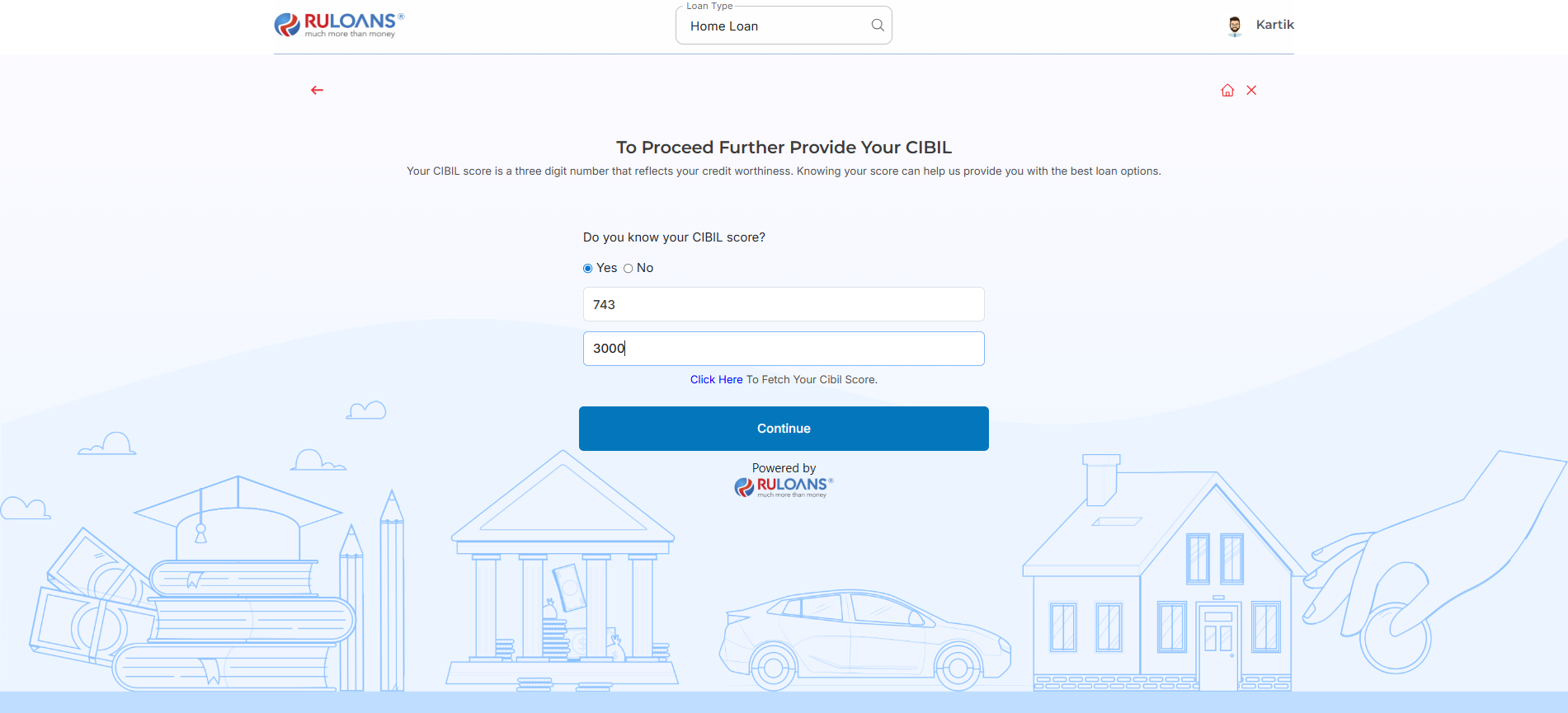
 ## Step 7: Know Your CIBIL Score?
* If you select **Yes**:
* **CIBIL Score**: Enter your 3-digit credit score (e.g., 750).
* **Monthly EMI**: Total of all active loan EMIs you're paying.
* If you select **No**: User will be redirected to Step 8.
* If you Tap **Skip**: User will be redirected to Step 10.
* Tap **Continue**.
## Step 7: Know Your CIBIL Score?
* If you select **Yes**:
* **CIBIL Score**: Enter your 3-digit credit score (e.g., 750).
* **Monthly EMI**: Total of all active loan EMIs you're paying.
* If you select **No**: User will be redirected to Step 8.
* If you Tap **Skip**: User will be redirected to Step 10.
* Tap **Continue**.
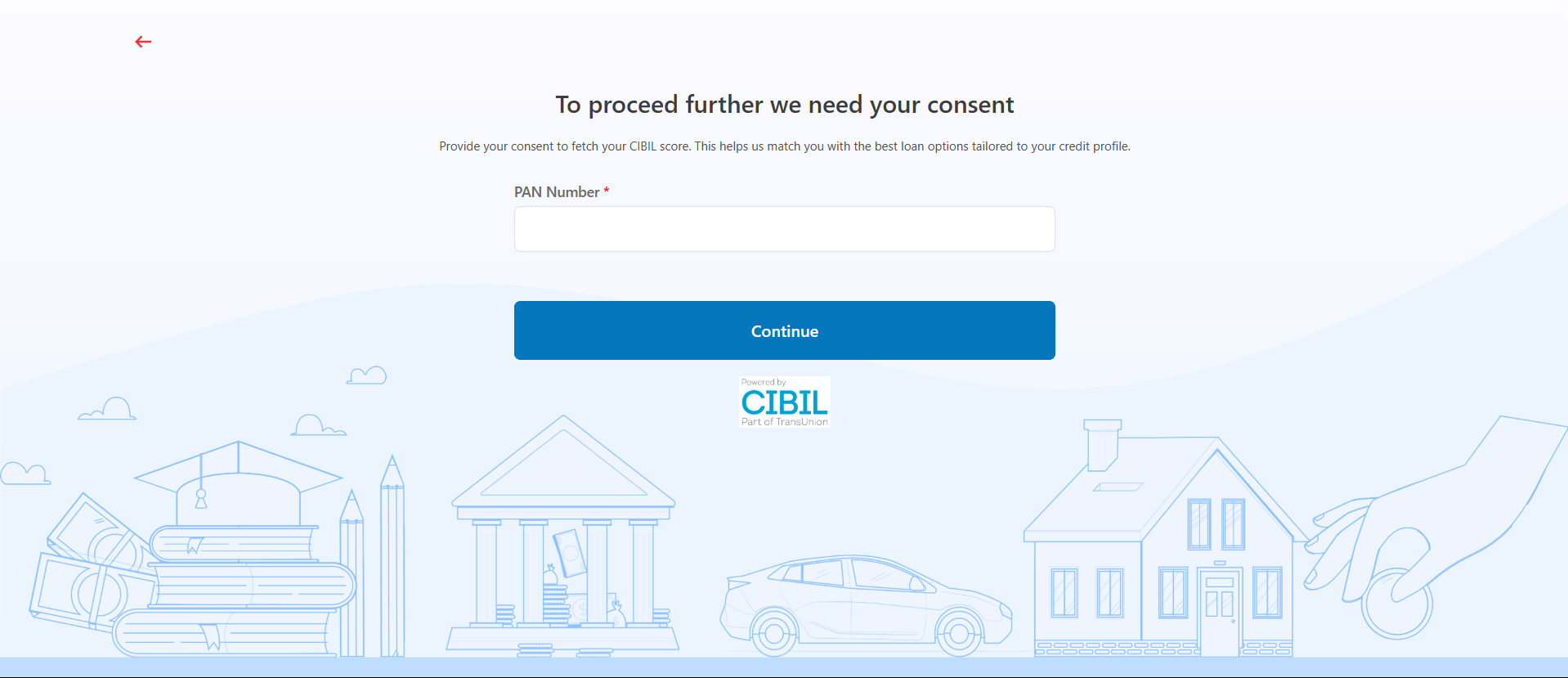
 ## Step 8: Enter PAN Number & Give Consent
* **PAN Number**: Enter your 10-character PAN (e.g., ABCDE1234F).\
Required to verify your credit score and match loan offers.
* Tap **Continue**.
## Step 8: Enter PAN Number & Give Consent
* **PAN Number**: Enter your 10-character PAN (e.g., ABCDE1234F).\
Required to verify your credit score and match loan offers.
* Tap **Continue**.
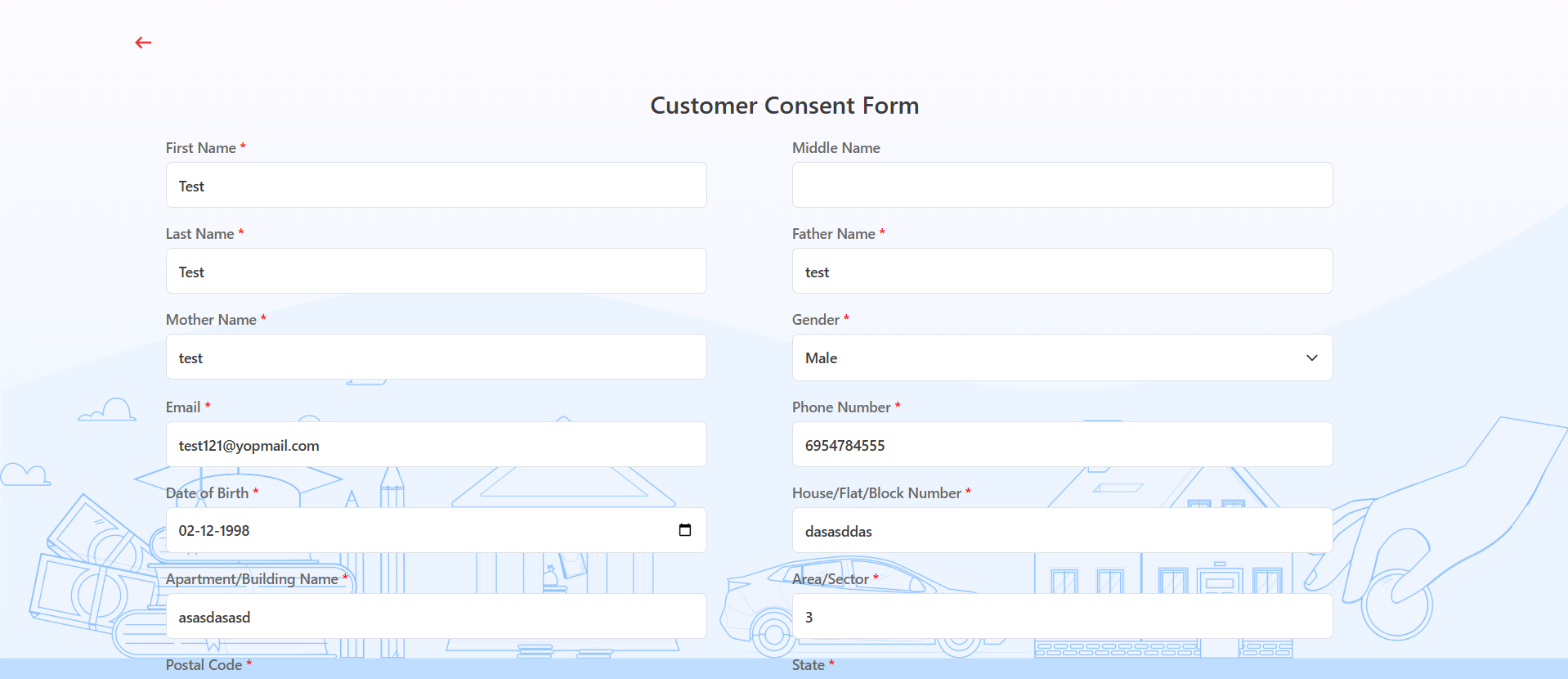
 ## Step 9: Fill Personal & Address Details for CIBIL
**Personal Details**
* **First Name**: Enter your First name.
* **Middle Name**: Enter your Middle name (optional).
* **Last Name**: Enter your Last name.
* **Father's Name**: Enter your Father's full name.
* **Mother's Name**: Enter your Mother's full name.
* **Gender**: Select your gender from the dropdown.
* **Email ID**: Enter your email ID.
* **Mobile Number**: Enter your mobile number.
* **Date of Birth**: Enter your date of birth.
**Address Details**
* **House / Flat / Block Number**: Enter the house/flat/block number of the address.
* **Building / Apartment Name**: Enter the building/apartment name of the address.
* **Area / Sector**: Enter the area/sector of the address.
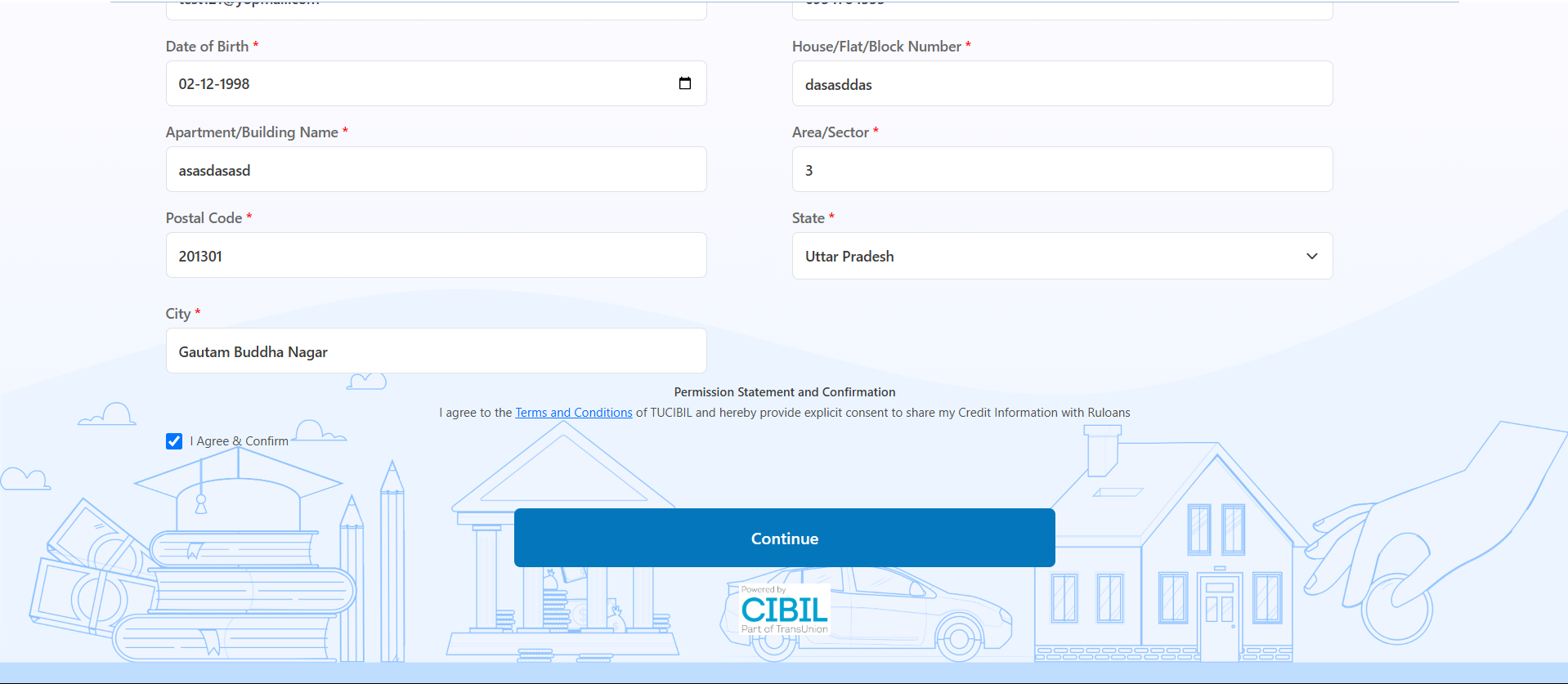
* **Pincode**: Enter the pincode of the address.
* **City**: Select the city from the dropdown.
* **State**: Select the state from the dropdown.
Tick **I Agree & Confirm** to give consent.\
You may review the Terms & Conditions.\
Tap **Continue**
## Step 9: Fill Personal & Address Details for CIBIL
**Personal Details**
* **First Name**: Enter your First name.
* **Middle Name**: Enter your Middle name (optional).
* **Last Name**: Enter your Last name.
* **Father's Name**: Enter your Father's full name.
* **Mother's Name**: Enter your Mother's full name.
* **Gender**: Select your gender from the dropdown.
* **Email ID**: Enter your email ID.
* **Mobile Number**: Enter your mobile number.
* **Date of Birth**: Enter your date of birth.
**Address Details**
* **House / Flat / Block Number**: Enter the house/flat/block number of the address.
* **Building / Apartment Name**: Enter the building/apartment name of the address.
* **Area / Sector**: Enter the area/sector of the address.
* **Pincode**: Enter the pincode of the address.
* **City**: Select the city from the dropdown.
* **State**: Select the state from the dropdown.
Tick **I Agree & Confirm** to give consent.\
You may review the Terms & Conditions.\
Tap **Continue**
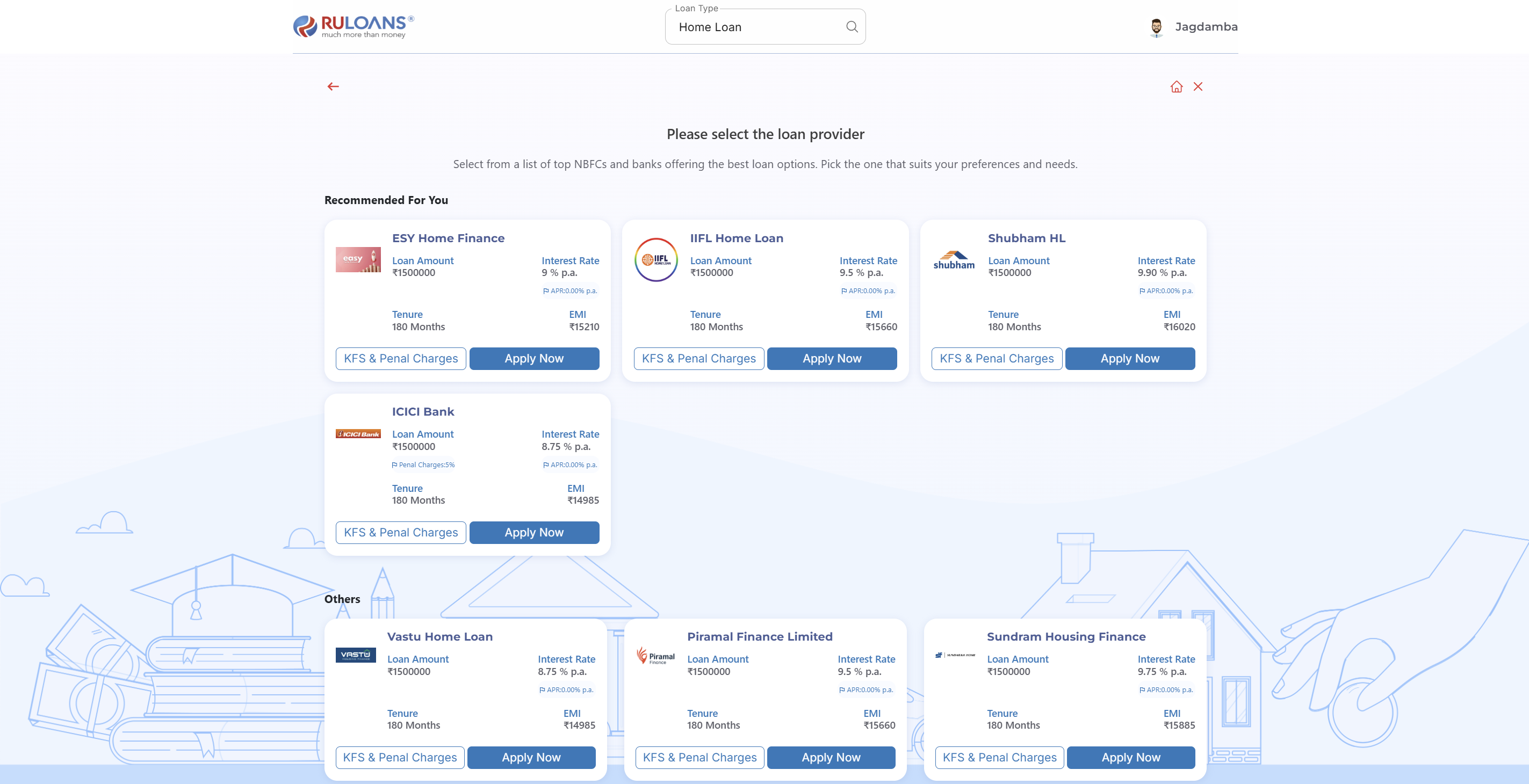
 ## Step 10: Get Your Recommended Offers
* Based on your details, view loan offers from lenders like:
* **ESY Home Finance**, **Sunadaram**, **Piramal Finance**, **DMI**, and more.
## Step 10: Get Your Recommended Offers
* Based on your details, view loan offers from lenders like:
* **ESY Home Finance**, **Sunadaram**, **Piramal Finance**, **DMI**, and more.
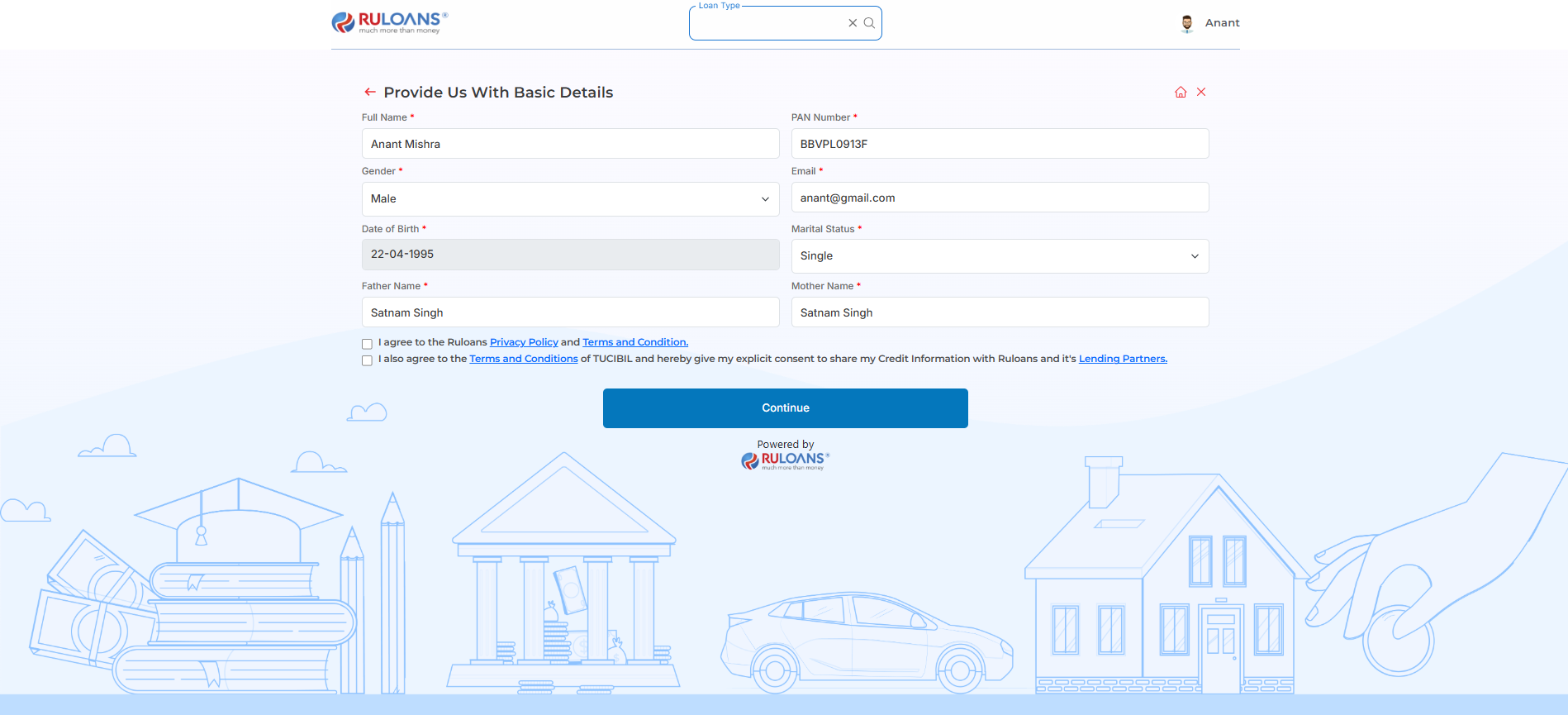
 ## **Step 11: Provide Basic Details**
1. Mandatory Fields:
* Full Name, PAN Number, Gender, Email, Date of Birth, Marital Status, Father's Name, and Mother's Name.
2. Consent:
* Select checkboxes for Privacy Policy and Credit Information consent.
3. Action:
* Click Continue to proceed.
## **Step 11: Provide Basic Details**
1. Mandatory Fields:
* Full Name, PAN Number, Gender, Email, Date of Birth, Marital Status, Father's Name, and Mother's Name.
2. Consent:
* Select checkboxes for Privacy Policy and Credit Information consent.
3. Action:
* Click Continue to proceed.
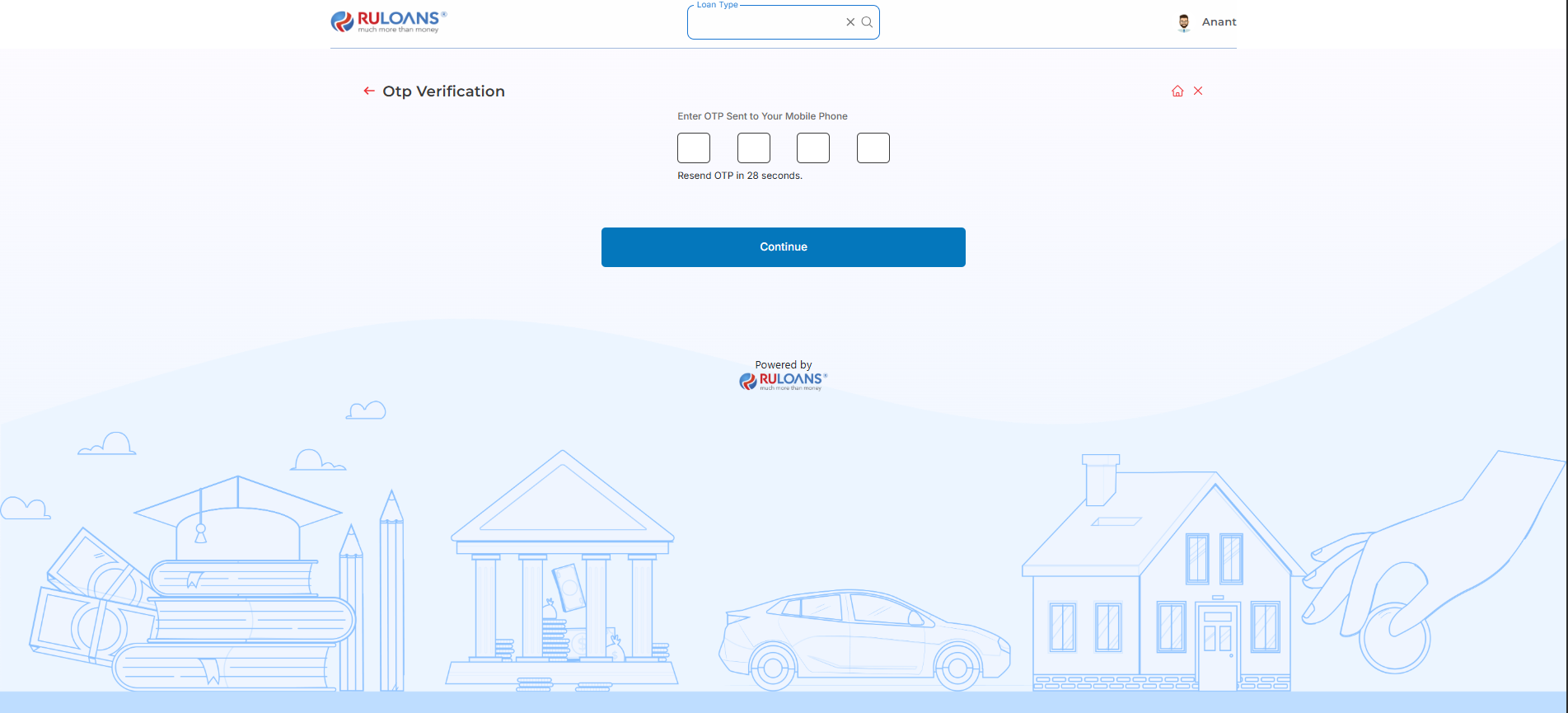
 ## **Step 12: OTP Verification**
Enter the One-Time Password (OTP) sent to the registered mobile number for verification.
## **Step 12: OTP Verification**
Enter the One-Time Password (OTP) sent to the registered mobile number for verification.
 ## **Step 14: Thank You Screen**
After sucessfully submit the OTP the user will redirect to the Hero Fincorp platform to complete the another formalities to process their loan and the Thank You screen will appear on the Ruconnect website.
## **Step 14: Thank You Screen**
After sucessfully submit the OTP the user will redirect to the Hero Fincorp platform to complete the another formalities to process their loan and the Thank You screen will appear on the Ruconnect website.