> ## Documentation Index
> Fetch the complete documentation index at: https://docs.ruloans.com/llms.txt
> Use this file to discover all available pages before exploring further.
# Bulk assign feature
# **Bulk Assign feature**
This guide explains how to assign partners to leads using the **Bulk Assign** feature within the CRM system under **Channel Partners**.
**Overview:**
The **Bulk Assign** feature allows users to update or change the **Channel Partner** for multiple **DSAs** at once using filters. This helps in managing large sets of users more efficiently without the need to update each one individually.
***
## **Steps to Bulk Assign**
### **🔹 1. Navigate to the Channel Partners Section**
* Log in to the **CRM**.
* Go to the **DSA** module.
* Click on **Channel Partners**.
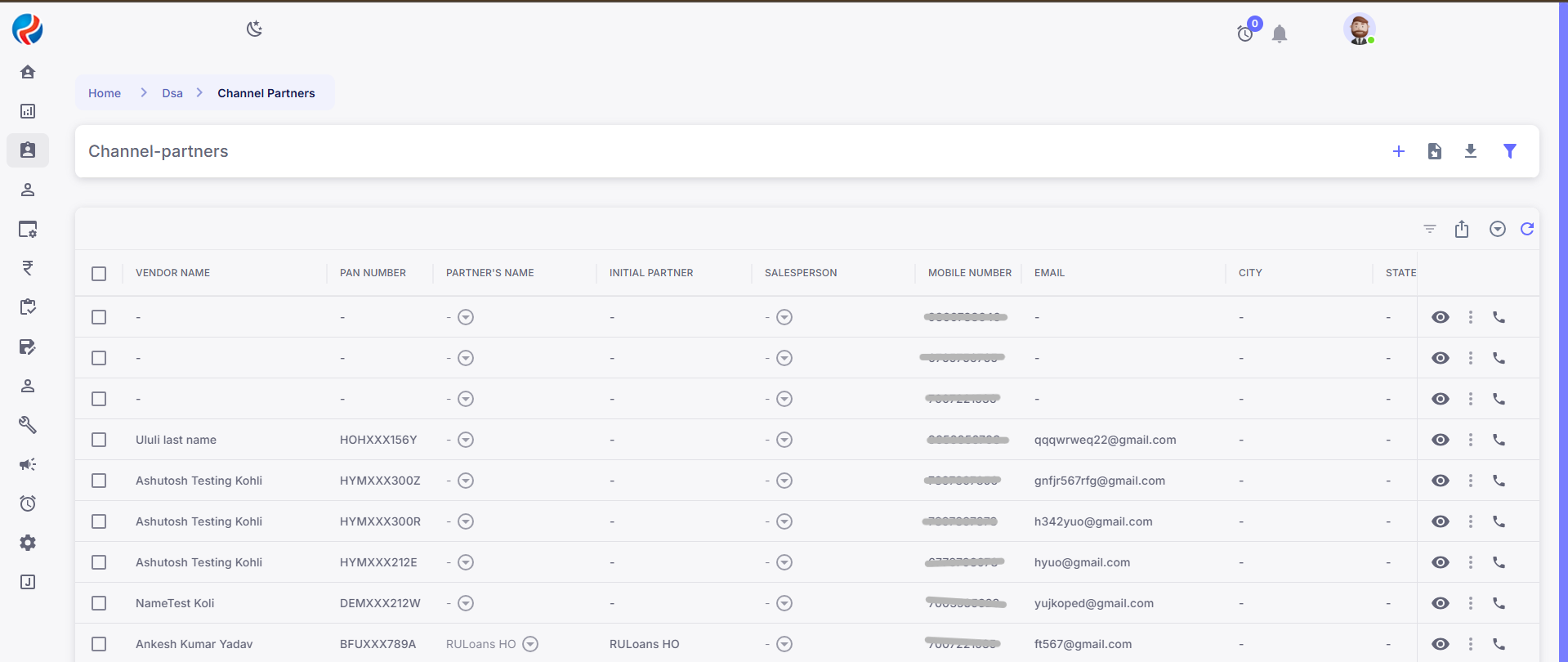
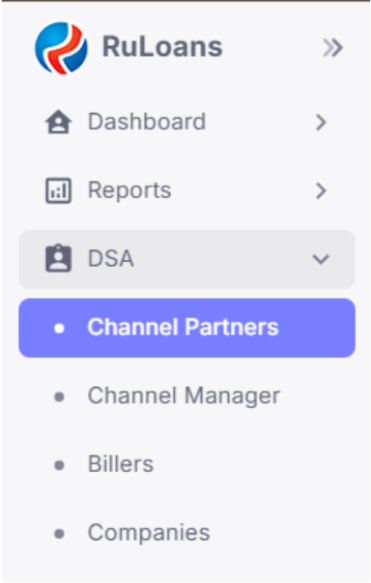 ✅ You will now see the **Channel Partners** page.
 ***
### **🔹 2. Locate the Assign Button**
Just below the **Channel Partners** heading, you will see three buttons:
* **Export**
* **Assign**
* **Refresh**
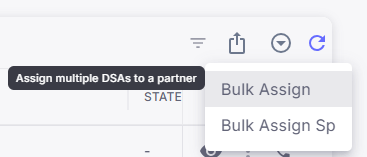
Click on the **Assign** button to open a dropdown menu.
***
### **🔹 2. Locate the Assign Button**
Just below the **Channel Partners** heading, you will see three buttons:
* **Export**
* **Assign**
* **Refresh**
Click on the **Assign** button to open a dropdown menu.
 ***
### **🔹 3. Select "Bulk Assign"**
From the dropdown, click on **Bulk Assign**.
This will open the assignment panel where you can choose filters and select a Partner.
***
## **Method 1: Bulk Assign via Filters**
### **Step-by-Step:**
1. **Click on Assign > Bulk Assign:**
***
### **🔹 3. Select "Bulk Assign"**
From the dropdown, click on **Bulk Assign**.
This will open the assignment panel where you can choose filters and select a Partner.
***
## **Method 1: Bulk Assign via Filters**
### **Step-by-Step:**
1. **Click on Assign > Bulk Assign:**
 2. **Select the Filter and Partner:**
* A pop-up window will appear asking:
* **Which filter** of users (DSAs) you want to apply (e.g., location, status, team, etc.).
* **Which Channel Partner** should be assigned to these filtered DSAs.
2. **Select the Filter and Partner:**
* A pop-up window will appear asking:
* **Which filter** of users (DSAs) you want to apply (e.g., location, status, team, etc.).
* **Which Channel Partner** should be assigned to these filtered DSAs.
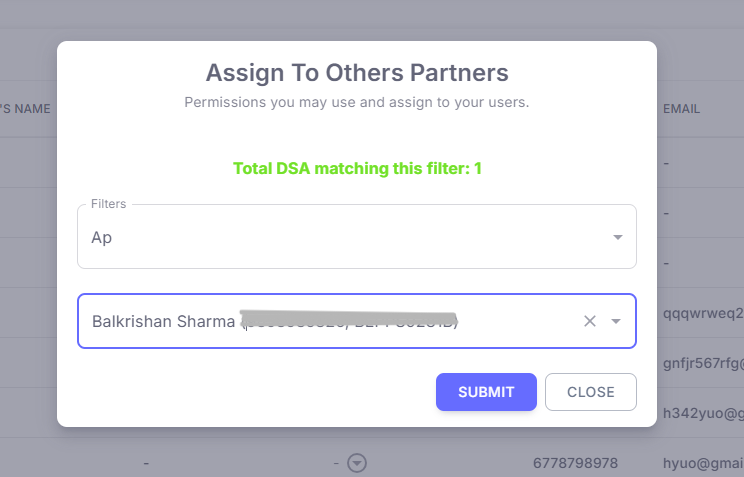 3. **Click Submit:**
* Once selected, click **Submit**.
* All selected leads will be assigned to the selected partner.
***
## **Method 2: Manual Selection of Leads**
If you want to assign a partner to specific leads manually:
1. **Select the Leads:**
* On the Channel Partners page, tick the checkboxes for the leads you want to assign or reassign.
3. **Click Submit:**
* Once selected, click **Submit**.
* All selected leads will be assigned to the selected partner.
***
## **Method 2: Manual Selection of Leads**
If you want to assign a partner to specific leads manually:
1. **Select the Leads:**
* On the Channel Partners page, tick the checkboxes for the leads you want to assign or reassign.
 2. **Click Assign > Bulk Assign:**
* Click on the **Assign** button again and choose **Bulk Assign**.
3. **Select Partner:**
* A Pop up will appear that will ask for selecting the **partner name** to which you want to assign the leads to. select a partner from the dropdown.
4. **Submit:**
* Click **Submit** to complete the partner bulk assign.
***
**Benefits**
⏱️ **Time-saving:** No need to update DSAs one by one.
🎯 **Targeted Updates:** Use filters to precisely control which users get updated.
✅ **Efficient Reassignments:** Perfect for organizational restructuring or workload balancing.
***
**Prepared By:** Aparmita Srivastav
2. **Click Assign > Bulk Assign:**
* Click on the **Assign** button again and choose **Bulk Assign**.
3. **Select Partner:**
* A Pop up will appear that will ask for selecting the **partner name** to which you want to assign the leads to. select a partner from the dropdown.
4. **Submit:**
* Click **Submit** to complete the partner bulk assign.
***
**Benefits**
⏱️ **Time-saving:** No need to update DSAs one by one.
🎯 **Targeted Updates:** Use filters to precisely control which users get updated.
✅ **Efficient Reassignments:** Perfect for organizational restructuring or workload balancing.
***
**Prepared By:** Aparmita Srivastav